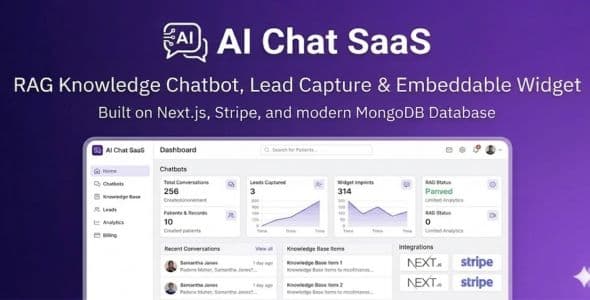
AI Chat SaaS — RAG Knowledge Chatbot, Lead Capture & Embeddable Widget (Next.js, Stripe)
AI Chat SaaS is a production-ready, multi-tenant subscription platform where your customers build RAG (retrieval-augmented) AI chatbots from their own content, preview them in the app, capture leads from the embeddable widget, and deploy that widget on any site. You monetize with Stripe subscriptions (including paid checkout sign-up), manage plans and users from a super admin panel, and ship faster than stitching auth, billing, and AI from scratch.
Built with Next.js (App Router), TypeScript, MongoDB, NextAuth (email/password + optional Google), OpenAI for embeddings and chat, and Stripe for billing. Stripe and SMTP are configured from the admin UI (database-backed settings).
Live demo & documentation
Live demo: https://saas-rag.vercel.app/
Docs (HTML): https://saas-rag.vercel.app/docs/documentation.html
Super admin (demo):
Email: admin@saaskit.com
Password: admin123
Regular user (demo):
Email: user@saaskit.com
Password: admin123
Change passwords after first login. Demo URLs are examples—replace with your deployment.
What makes this product different
- Per-tenant RAG chatbots — Users create bots under AI Chatbots, attach sources (URLs and/or text), run ingest to chunk and embed, then chat with context-grounded answers—not a single generic site-wide bot only.
- Embeddable widget — Public rag-widget.js snippet plus /api/embed/* routes for widget config, chat, and optional lead capture on customer websites.
- Per-user OpenAI keys — Users can add an OpenAI API key under Settings → AI (stored encrypted server-side) for inference and embeddings.
- Stripe SaaS billing — Plans, subscriptions, invoices, proration-style upgrades, webhooks; paid plan sign-up can go through Stripe Checkout with post-payment sign-in flow.
- Full platform features — Landing page, super admin, user dashboard, support tickets, AI content tools, analytics insights, plan recommendations, usage limits, and more.
RAG chatbots & embed (core)
- Dashboard area: /chatbots — create/manage chatbots, sources, ingestion, preview, analytics, leads.
- APIs (authenticated): /api/user/rag-chatbots and nested routes for sources, ingest, analytics, leads.
- Embed (public): /api/embed/widget-config, /api/embed/chat, /api/embed/lead.
- Static script: public/embed/rag-widget.js — include on external sites with your app URL and chatbot id.
Key features
- RAG knowledge chatbots — URL/text ingestion, vector retrieval, OpenAI-powered replies.
- Embeddable chat widget — Drop-in script for client websites; CORS-safe embed endpoints.
- Beautiful marketing landing page — Hero, features, pricing, testimonials (CMS-friendly).
- Super admin panel — Users, plans, content, invoices, settings (Stripe, email), analytics, support tickets, AI tools.
- User dashboard — Profile, billing, usage, chatbots, support, settings.
- Authentication — NextAuth: credentials + optional Google OAuth.
- Stripe — Subscriptions, invoices, webhooks; test/live keys in admin settings.
- Smart billing — Upgrades/downgrades with proration-aware flows and plan history.
- Usage & limits — Plan-based limits for chatbots and usage.
- Email — SMTP from settings; transactional templates (welcome, billing, etc.).
- Support tickets — Users and admins with statuses, priority, threaded replies.
- AI extras — Content generator (admin), AI analytics insights, AI plan recommendations (billing).
- Responsive UI — Tailwind CSS; works on desktop and mobile.
Tech stack
- Next.js (App Router), React, TypeScript
- MongoDB + Mongoose
- NextAuth.js
- Stripe
- OpenAI API (embeddings + chat for RAG and AI tools)
- Tailwind CSS
- Nodemailer (SMTP)
What’s included
- Full source code (TypeScript)
- User app + super admin + marketing landing
- RAG models, ingest pipeline, embed APIs, widget script
- Stripe + webhook route (checkout.session.completed and related events as configured)
- Email system and templates
- Documentation (public/docs, README, integrations notes)
- Seed script for demo data (adjust for production)
Requirements
- Node.js 18+
- MongoDB (Atlas or self-hosted)
- Stripe account for payments
- SMTP for mail (any provider)
- OpenAI API access for RAG and AI features (users may supply keys in-app)
Quick start (summary)
- npm install
- Copy env.example to .env.local — set MONGODB_URI, NEXTAUTH_URL, NEXTAUTH_SECRET, optional GOOGLE_* and OPENAI_API_KEY
- npm run seed (optional demo data)
- npm run dev
- Configure Stripe & SMTP in Super Admin → Settings (save settings; test connection as needed)
- Configure Stripe webhook to your deployed /api/webhooks/stripe including checkout.session.completed for paid signups
Support & updates
Documentation is included. For presale questions or implementation help, use the contact options on your profile or item comments as per CodeCanyon policy.
Important notes
- This is a self-hosted web application; you deploy it on your own hosting (e.g. Vercel, Node host, Docker).
- OpenAI and Stripe usage incur third-party fees under their terms.
- Replace demo credentials and URLs before production.
AI Chat SaaS — ship a real AI chat product with RAG, embeds, and Stripe billing.